Sales leaders
Know what was promised on every call. The summary, the next step and a sales review against your own criteria sit on the lead or opportunity.
Quality reviews
A Creomate product for sales, service and contact-centre teams on Creatio
Keep your PBX.
Bring every conversation into Creatio.
A SIP softphone with built-in AI that works with the telephony you already have. Each call arrives on the right Creatio record with its recording, transcript, summary and quality review — and your scripts, prompts and phone settings are managed in one place.
From $12 / user / month for telephony in Creatio · $35 with AI analysis
Billed annually · Minimum 5 users · Use any cloud AI service or fully local models.
Know what was promised on every call. The summary, the next step and a sales review against your own criteria sit on the lead or opportunity.
Quality reviewsSee whether the issue was understood and resolved, and whether the script was followed — without listening to every recording.
Scripts and prompterNo PBX migration. The softphone registers as a standard SIP extension; lines, encryption and recording rules are set per team profile.
Technical detailsUsers sign in with Creatio. Results land on mapped records, and prompts, scripts and settings are distributed to every softphone from Creatio.
Central managementAI Softphone sits between the telephony you already run and Creatio. It needs three things: a SIP account, a Creatio sign-in and the AI services you choose.
Register the softphone with your SIP PBX or provider. Agents sign in with their Creatio account and receive their lines and settings.
Calls are made and answered in the softphone or straight from a Creatio record. The prompter shows the script while the customer is still on the line.
The recording becomes a transcript, a summary, next steps and a sales or support review against your criteria.
Results are attached to the call and its contact, lead, opportunity or case, so follow-up, coaching and reporting start from facts.
The next colleague gets the conversation itself, what it meant and a clear starting point for follow-up — without anybody typing notes.
Two channels, agent and customer, so who said what is never in doubt.
Speaker by speaker, searchable, in the language the call was held in.
The outcome, the agreements, and who does what by when.
Category, tags, names, amounts and dates picked out of the conversation.
A sales or support score against the criteria you define, with evidence.
Complaints, churn risk, a competitor, a broken promise — surfaced early.
AI reviews support your supervisors’ judgement and should be checked when they affect important decisions.
The softphone has a local REST API and built-in webhooks. Creatio uses the first to drive the phone and the second to hear what happens on the line.
Dial from a contact, lead or case. Creatio asks the softphone to place the call on the agent’s own line.
The caller’s record opens while the phone is still ringing — or a new lead when the number is unknown.
Direction, line, duration and outcome are saved when the call ends. A transferred call stays one conversation.
Answer, hold, transfer and hang up from Creatio, or from the softphone itself — whichever is nearer to hand.
10:42:03call-startedcontact found by number, record opened 10:42:09call-state-changedactive — agent shown as on a call 10:48:21call-endedcall saved: answered, 6 min 12 s 10:49:02after analysisrecording, transcript, summary and review attachedA supervisor can listen to a handful of calls a week. Here every conversation handled in the softphone is reviewed against criteria you write, and the results are collected in Creatio.
Describe in plain language what a good sales or support call looks like: needs discovered, objection answered, issue restated, next step agreed. Change the criteria in Creatio whenever your standards change.
Red flags mark the calls that need attention — a complaint, a promise without a date, a competitor, sensitive data — each with the quote and the moment it was said.
Compare agents and teams over any period, see which criteria are missed most often, and open the exact place in the transcript instead of replaying the whole call.
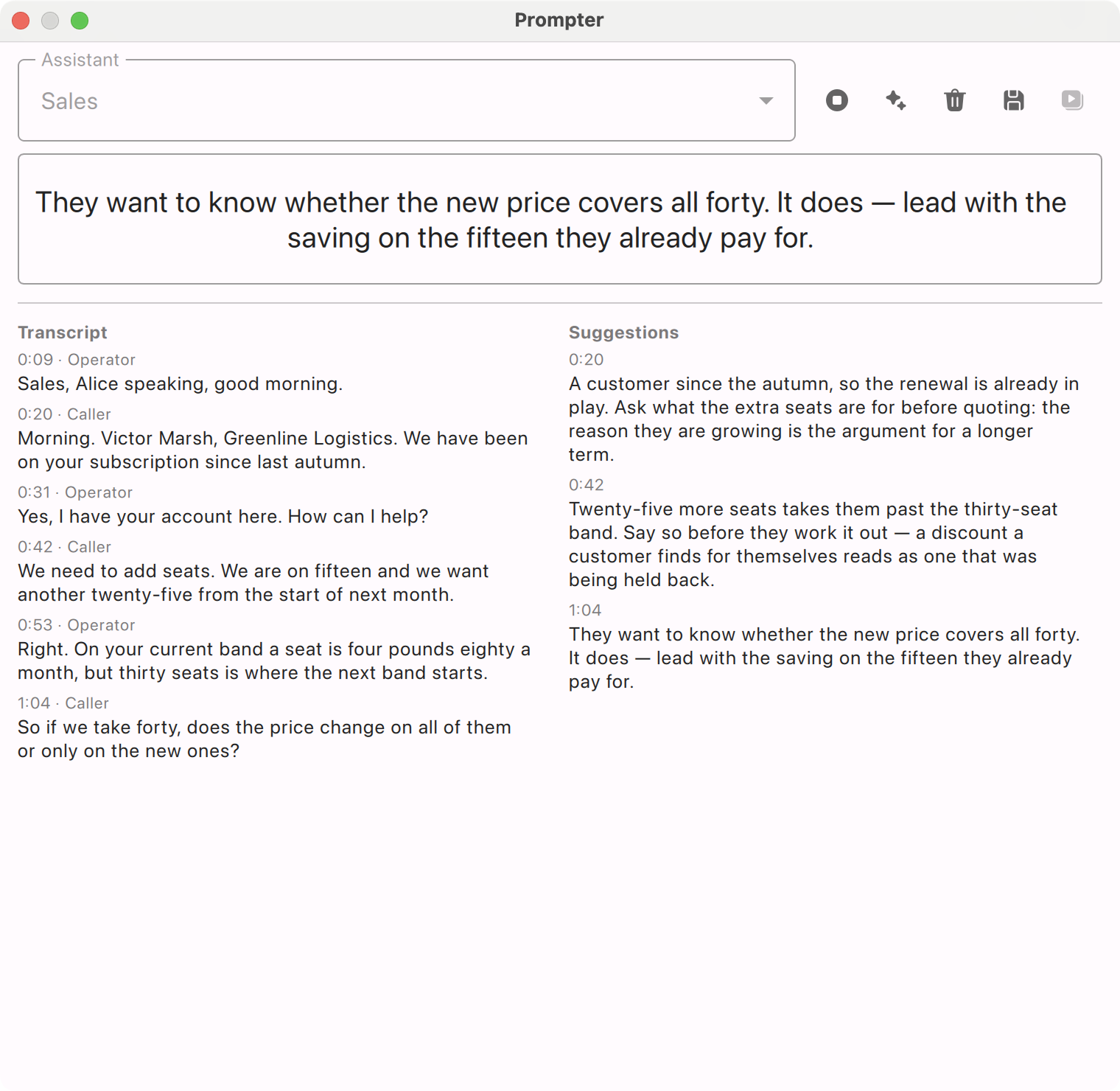
Write the script once in Creatio. The softphone shows it in the live prompter while the customer is on the line, and checks afterwards which steps were covered.
The agent sees the conversation as text, the current step of the script and a suggested answer — an objection met, a question worth asking. It is the window to keep open on a difficult call, or in a new employee’s first week.
Openings, discovery and diagnostic questions, approved answers and closing steps live in Creatio. Publish a change and every softphone uses it on the next call; nothing is edited workstation by workstation.
The same console holds the AI instructions: what a summary must contain, which details to extract, how sales and support conversations are judged. Managers change them without code.
A new employee signs in with their Creatio account and receives a phone already set up to the team’s standard. A change made once reaches every seat.
No separate user list. Access to the softphone follows the Creatio account, and so do the records the agent’s calls are written to.
SIP lines, encryption, recording rules, AI services and spending limits are defined per team rather than per computer.
Scripts, prompts, quality criteria, categories and dictionaries are published from Creatio to the softphones that should use them.
One desktop app for all three. Personal choices such as the headset and the ringtone stay with the user.
AI Softphone brings no model of its own and sells you none. Connect the services you already trust with your own keys, or run both speech recognition and the language model on your own servers.
Use the leading providers directly. You pay them for what you use; nothing is resold or marked up.
Language modelsAny other service with an OpenAI-compatible API works as well, whether it is named here or not.
Run recognition and the language model on your own hardware. Audio, transcripts and summaries are processed inside your network and are not sent to any outside service.
Local language modelsChoose one model for summaries and another for quality reviews, when the task calls for it.
Every processed call is priced in tokens and in money. A monthly limit pauses automatic processing instead of surprising you.
Switch provider, or move from cloud to local models, in the settings. Your scripts, prompts and criteria stay as they are.
Product names and marks belong to their owners.
What is installed where, which protocols are used and where the data goes.
Not sure about your PBX or Creatio version? Send us the details and we will confirm compatibility before you commit.
127.0.0.1, default port 8377. POST /calls, then answer, hold, resume, transfer, DTMF and hang up; GET active calls, history, accounts and contacts. Optional token, access groups, Prometheus metrics.call-started, call-state-changed, call-ended. POST with a JSON body, or GET with a URL template. Custom header for authentication. Queued, in order, at least once; seance_id keeps a transferred call one conversation.Two plans, priced per named softphone user. Start with telephony inside Creatio and add conversation analysis when you are ready.
Telephony inside Creatio for the PBX you already have.
$12per user / month
Billed annually at $144 per user.
Minimum 5 users: $720 per year.
Every conversation analysed, scored and guided by your scripts.
$35per user / month
Billed annually at $420 per user.
Minimum 5 users: $2,100 per year.
$990one-time setup fee
Connect one Creatio instance to one PBX and get your team ready to work.
Custom development, historical data migration and additional PBXs or Creatio instances are quoted separately.
Creatio licences, PBX and carrier services, speech recognition and AI model usage, infrastructure and storage. Connect your own provider accounts or use locally hosted models. AI minutes are not included.
All prices are in USD, excluding applicable taxes. Subscription and standard implementation are separate charges.
Yes. AI Softphone registers with your PBX or provider as a standard SIP extension, so numbers, trunks, queues and routing stay where they are. We check your PBX’s policy for third-party SIP clients, network configuration and call features before deployment. A PBX that restricts external SIP clients needs a separate compatibility assessment.
Through two documented mechanisms of the softphone. Creatio calls its local REST API to place and control calls, and the softphone sends webhooks to Creatio when a call starts, changes state and ends. That covers click-to-call, screen pop and call logging without a middleware server.
The standard workflow processes calls handled by AI Softphone. Calls made on other desk phones or clients require a separate recording source and integration scope.
Yes. Scorecards, prompts and scripts are plain-language instructions that your managers edit in Creatio. Standard implementation includes basic summary and sales or support review templates to start from.
No. It reviews each conversation against your criteria and points to the calls worth a supervisor’s time, with the quote behind each finding. Decisions that matter to a customer or an employee should be checked by a person.
The ones you choose. The leading cloud services are supported directly — OpenAI, Anthropic Claude, Google Gemini, xAI Grok, Mistral, DeepSeek and Groq for language models; Whisper, Deepgram, ElevenLabs, AssemblyAI, Speechmatics and Soniox for speech recognition — and any other service with an OpenAI-compatible API works too. You connect your own accounts and keys.
Yes. Both speech recognition and the language model can run on your own servers — for example self-hosted Whisper, NVIDIA Riva or Vosk for recognition, and Ollama or vLLM for the model. Together with your own PBX and an on-site Creatio, conversations are then processed entirely inside your network. We select and test the processing route for your deployment.
This is agreed during setup: the target Creatio records, the field mapping, and how recordings are stored and made available to the people allowed to hear them. With local speech recognition and a local LLM, audio and text do not leave your network for processing.
The softphone can play a spoken announcement or a tone, or wait for the agent’s confirmation before it records; the rule is set for the team. Which rule you need depends on the law that applies to your calls.
The desktop softphone is available as free software. The Creatio product adds the connected CRM and Service Desk workflow, Creatio authorisation, central configuration and implementation support. Creatio, telephony and external AI services have their own licences or usage charges.
Send us your Creatio version, user interface, deployment type and PBX model. We confirm compatibility and the required configuration for your environment before rollout.
Request a demonstration of the connected workflow and a quote for your team. Tell us your PBX, Creatio version, number of users and approximate monthly call volume.
Product enquiries and deployment support by Creomate.